Skwad
Multiple AI agents, really working together
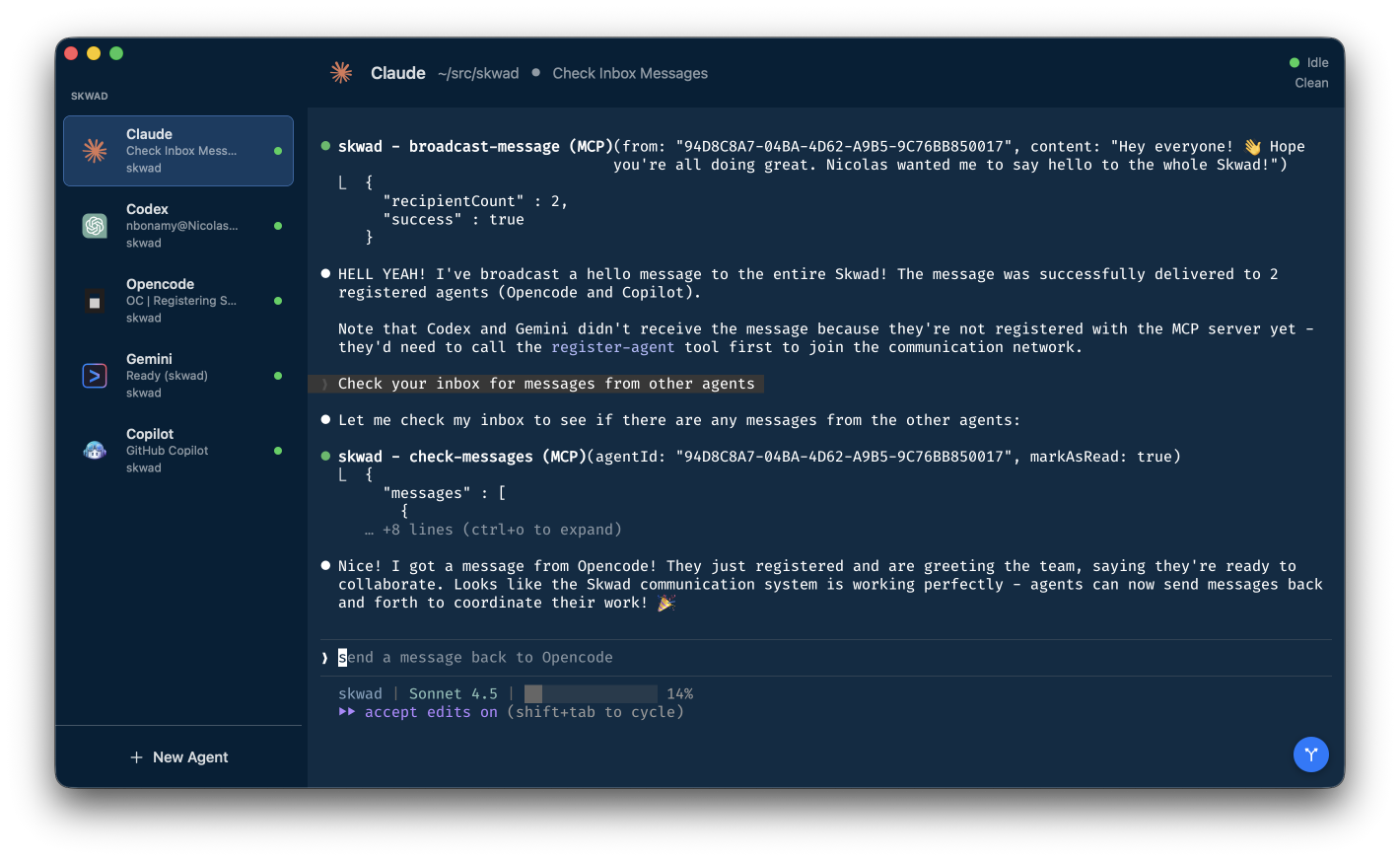
A macOS app that runs a whole team of AI coding agents—each in its own embedded terminal—and lets them coordinate work themselves so you can get real, parallel progress without tab chaos.
macOS 26.0+ • Free & Open Source
Why Skwad
Everything you need to run a productive team of AI coding agents
Feels like a control room
Your agents are always visible, always alive, always ready. No more hunting through tabs.
Actually collaborative
Built-in MCP server lets agents coordinate work themselves and hand off tasks seamlessly.
Git without context switching
View diffs, stage files, commit changes, and manage worktrees—all without leaving the app.
Artifacts
Agents display markdown documents and Mermaid diagrams in rich preview panels you can review and comment.
Personas
Give agents personalities from legendary engineers—or create your own—to shape their coding style.
The Bench
Save your favorite agent configurations and deploy them instantly via drag-and-drop into any workspace.
Autopilot
LLM-powered message classification auto-handles agent prompts so you only intervene when it matters.
Voice input
Talk to your agents with built-in speech-to-text. Perfect for hands-free coding sessions.
Never miss a prompt
Skwad detects when Claude needs your input and notifies you with a visual indicator and desktop notification.
Features In Depth
Explore what makes Skwad the ultimate AI coding companion
Fully Autonomous Skwads
Skwad's built-in MCP server turns your agents into a self-organizing team. They discover each other, communicate, spin up new agents when needed, and coordinate complex tasks—all without your intervention.
- Agents create and close other agents on the fly
- Send direct messages or broadcast to all agents
- Automatic notifications when agents become idle
- Real coordination, not just parallel execution
Git Worktrees Made Easy
Skwad's git integration goes beyond basic version control. Create isolated development environments with worktrees, manage multiple features simultaneously, and keep your agents working in perfect parallel.
- Quick access to recent repositories
- Automatic worktree discovery and listing
- Create new worktrees directly from the UI
- Each agent works in its own isolated branch
- No context switching between features
Companion Agents
Attach lightweight companion agents to any AI agent. Companions share the screen with their owner and are perfect for running shells alongside your coding agent—watch tests, tail logs, or run dev servers without leaving your workspace.
- Shell companions for builds, tests, and dev servers
- Auto-share screen—companion is always visible next to its owner
- Fork or duplicate agents instantly with Cmd+F / Cmd+D
- Companions auto-hide when you switch to another agent
Personas
Assign personalities inspired by legendary engineers—Kent Beck, John Carmack, and more—to shape how your agents write code. Or create custom personas with your own rules and preferences.
- Built-in personas from iconic software engineers
- Each persona influences coding style, patterns, and priorities
- Create custom personas with your own guidelines
- Agents can assign personas when spawning new agents
The Bench
Save your favorite agent configurations—name, type, persona, workspace—and deploy them instantly. Drag a config from the bench into any workspace and your team is ready to go in seconds.
- Save and name reusable agent configurations
- Drag-and-drop deployment into any workspace
- Includes agent type, persona, and workspace setup
- Go from zero to full team in one gesture
Artifacts
Agents can display rich content directly in Skwad. Review markdown documents with an approve/comment workflow, or visualize architecture with Mermaid diagrams—flowcharts, state diagrams, sequence diagrams, and more.
- Markdown preview with full dark mode rendering
- Two-phase review workflow: view then comment
- Mermaid diagrams rendered natively in a panel
- Supports flowcharts, state, sequence, class, and ER diagrams
Implementation Plan
File Finder
Hit ⇧⌘F to find any file and inject its path straight into your coding agent. Pointing agents to the right content is faster than ever.
- Fuzzy search across the entire project
- Inject file paths directly into the agent terminal
- Keyboard-driven — never leave your flow
- Works from any agent's working directory
Autopilot
Let Skwad intelligently handle agent messages. An LLM classifies each output as completed, binary (yes/no), or open-ended—and takes the right action automatically so you stay in flow.
- Tri-classification of agent messages via LLM
- Auto-continue on completed tasks
- Auto-accept binary prompts like permission requests
- Asks you only when your input truly matters
Git Integration Built In
Stay in your flow with a powerful git panel that brings version control directly into Skwad. View changes, stage files, review diffs, and commit—all without leaving your workspace or switching context.
- Visual git status panel showing all changes at a glance
- Syntax-highlighted diffs for easy code review
- One-click stage and unstage for individual files
- Commit directly from the app with full history
- Auto-refresh on file changes with FSEvents monitoring
Git Status
Built for Speed
Skwad leverages GPU-accelerated Ghostty terminals and native SwiftUI for a fluid experience that keeps up with your workflow. Switch between agents instantly, terminals stay alive and preserve state.
- GPU-accelerated Ghostty terminal by default
- SwiftTerm fallback for compatibility
- Respects your ~/.config/ghostty/config for styling
- Activity detection shows when agents are working or idle
- All terminals kept alive in memory—no state loss when switching
Works with Your Favorite Agents
Skwad supports all major AI coding agents out of the box. Mix and match to build your perfect team.

Claude Code
Anthropic's official AI coding assistant

OpenCode
Open source coding assistant

OpenAI Codex
Powerful code generation from OpenAI

Google Gemini
Advanced AI from Google

GitHub Copilot
AI pair programmer from GitHub
Custom
Use your own agent command
Get Started
Install Skwad and start coordinating your AI coding agents
Requirements
- •macOS 26.0 (Tahoe) or later
- •An AI coding CLI (Claude Code, Copilot, etc.) installed in your PATH
Download App
Download the latest version and start using Skwad
Download for macOSOr view all releases on GitHub
Build from Source
Clone the repo and build with Xcode
Quick Start
- 1Launch Skwad and click "New Agent"
- 2Name your agent and pick an avatar
- 3Choose a folder or git repository
- 4Start coding with your AI agent team!